dtSearch software dependencies
Article: dts0187
Applies to: dtSearch Desktop/Network
dtSearch requires the 64-bit and 32-bit versions of the "Microsoft Visual C++ Redistributable Packages". The files are named vc_redist.x86.exe and vc_redist.x64.exe, and are available from Microsoft at these links:
https://aka.ms/vs/17/release/vc_redist.x86.exe (Microsoft 32-bit Redistributable Download)
https://aka.ms/vs/17/release/vc_redist.x64.exe (Microsoft 64-bit Redistributable Download)
The dtSearch installer includes both of these packages and will install them with dtSearch they are missing or out of date.
If you are running dtSearch from a shared folder without installing it on each computer, or if you are deploying dtSearch with an MSI file, then these components may need to be installed so dtSearch can run.
The Microsoft redistributable packages support command-line switches for automatic deployment. To see the switches available for each file, run it with the /? command-line option. You will see a message like this summarizing the options available:
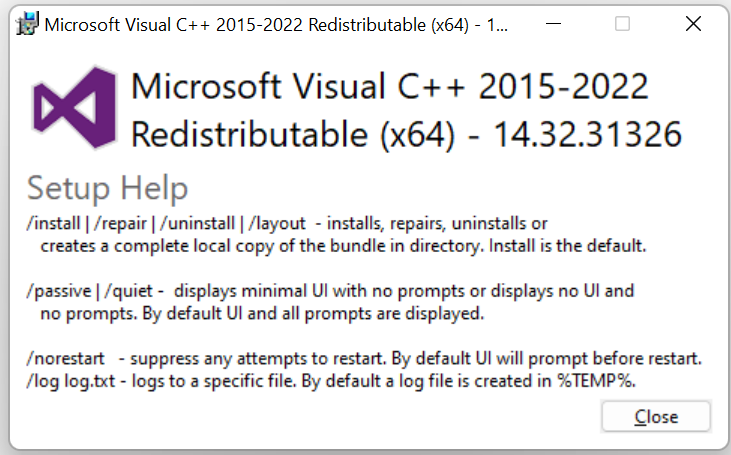
The options are documented on the Microsoft web site: "The Visual C++ Redistributable supports several command-line options. The /?, /h, or /help options display a pop-up dialog that lists the available options. You may specify /install to install, /repair to repair, or /uninstall to uninstall the Redistributable. The /layout option copies the complete contents of the Redistributable in the current directory. By default, the Redistributable installs its contents and prompts the user for information and whether to restart after installation. You can specify the /passive option, which displays progress, but doesn't otherwise require user interaction. You can also specify a /quiet option, which doesn't display any UI or require any user interaction. The /norestart option suppresses any attempts to restart. By default, a log file is created in %TEMP%. You can use /log filename.txt to log to a specific file." See: Redistributing Visual C++ Files | Microsoft Learn
For automatic deployment, the /passive or /quiet options can be used.
For more information on these components, please see: Redistributing Visual C++ Files (microsoft.com).