How to use logging with dtSearch Web
Article: dts0204
Applies to: dtSearch Web
dtSearch Web can log searches and document access to text files that you can use to generate reports. The log files are generated in CSV format, which you can import into Excel or most databases. The document access log will only log access to documents that have hits highlighted. dtSearch Web has no way to monitor access to documents that users open directly, without hit highlighting.
The location for the log file must be a folder that allows write access by the user account(s) that will be searching. Therefore, you may want to create a separate folder just for the log files.
To enable logging in dtSearch Web, check the Log document access or Log searches checkboxes in the File tab of the Form Builder dialog box.
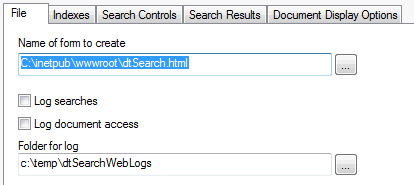
This will set up the search form for default logging of search requests or document access. Each search form can have its own separate log settings.
You can also enable logging for a search form by directly editing the generated options file. Directly editing the file gives you access to low-level options such as the fields that will be included in the log.
The entries in the generated options file that control logging are:
<BR><HR><I>Log searches: </I>
<!-- $Begin LogSearches -->
1
<!-- $End -->
<BR><HR><I>Log document access: </I>
<!-- $Begin LogDocumentAccess -->
1
<!-- $End -->
<BR><HR><I>Document log name template: </I>
<!-- $Begin DocumentLogNameTemplate -->
c:\temp\dtSearchWebLogs\dtSearch Docs %%Year%%-%%Month%%.log
<!-- $End -->
<BR><HR><I>Document log item template: </I>
<!-- $Begin DocumentLogItemTemplate -->
%%DateTime%%, "%%REMOTE_USER%%", "%%REMOTE_ADDR%%", "%%DocName%%", "%%Result%%"
<!-- $End -->
<BR><HR><I>Search log name template: </I>
<!-- $Begin SearchLogNameTemplate -->
c:\temp\dtSearchWebLogs\dtSearch Search %%Year%%-%%Month%%.log
<!-- $End -->
<BR><HR><I>Search log item template: </I>
<!-- $Begin SearchLogItemTemplate -->
%%DateTime%%, "%%REMOTE_USER%%", "%%REMOTE_ADDR%%", "%%SearchRequest%%", "%%SearchIndex%%", %%DocCount%%, "%%Result%%"
<!-- $End -->